
V3 Game Deposit
Understand what is visible in the historical V3 Game deposit screenshot before relying on an unfamiliar payment interface.
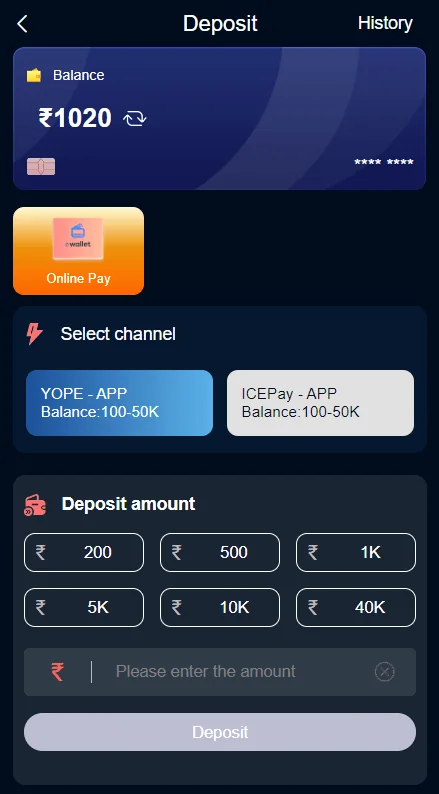
Historical deposit screen, November 2024. Amounts and channels may have changed.
QUICK ACCESS
V3 Game Deposit – What to know
Clear information, relevant screenshots and practical checks for the topic you selected.
What appears on the old deposit screen
The historical V3 Game deposit screenshot begins with a balance display. Beneath that is a payment area containing a channel selector. A lower section shows preset amount buttons and a manual amount field. A prominent action button appears at the bottom of the form. Together, these parts illustrate the general layout of an older account payment screen.
The channel labels and limits visible in that particular screenshot are time-specific. They should never be copied into a present-day promise about available methods, minimum amounts or eligibility. Likewise, a visible amount button is merely a control in an old interface; it is not a recommendation to choose that amount.
This site does not collect payment details, provide a deposit address or process transactions.
Payment channels are not proof of authenticity
A payment logo, banking name or recognizable symbol can appear on both legitimate and fraudulent pages. Authenticity depends on the actual operator, exact account destination, published terms and safe transaction handling. Never assume a payment page is trustworthy only because its colors match a screenshot.
Be particularly cautious when a message instructs you to send money directly to a personal account or to contact an unfamiliar support profile for a manual credit. The image archive cannot validate any active channel today.
Before making a financial decision, consider age and location rules, local law and the possibility of losing the entire amount involved.
Check statuses and receipts carefully
An on-screen confirmation, a payment authorization and a completed account credit can be separate events. If an interface displays a pending status, do not treat it as completed. A bank notification may also need to be reconciled with the service’s account history.
If a transaction appears incomplete, preserve the time and any safely shareable reference number. Avoid duplicating a transfer just because the interface has not refreshed. Repeated transactions can create a second problem without resolving the original one.
Never send full banking credentials, passwords, OTPs or private documents in a public group while seeking help.
How this relates to the wallet
The deposit screen is a narrow task-specific view. The wallet overview contains a broader set of balance and history controls, and the account screen includes other records. Understanding which view you are looking at can help you locate a status without confusing a pending request with a final balance.
If your question is about a password or an account lock rather than a payment form, use Account Help. If it concerns a historical outgoing request, use the Withdrawal information page. Each topic uses the matching supplied screenshot to avoid visual mismatches.
Current terms need current verification
An image dated November 2024 is not a reliable source for payment limits or fees in November 2026. Neither the current minimum amount nor the availability of any channel has been independently verified for this site. We therefore do not display old numerical limits as current requirements.
This independent website provides screen context only. It is not the operator, does not request funds and does not guarantee transaction success. When money-based gaming is involved, legal restrictions may prohibit participation or promotion depending on location.
A walkthrough of the visual layout
The historical deposit screenshot can be divided into three visual zones. The first contains the top navigation and a balance field. The middle contains a payment-method or channel area, where more than one option is shown. The lower portion contains preset amount buttons, an editable amount field and the main action. This organization helps distinguish a selectable amount from a final transaction confirmation.
A channel label visible in a 2024 example may no longer exist or could be interpreted differently in a newer version. Our image caption explicitly dates the capture so readers do not treat its wording as current financial advice.
Look for live descriptions of the selected method rather than copying values from an old screenshot.
Why a preset amount is only a UI element
The amounts printed on the screenshot are part of a historical form. Their presence does not mean a visitor should choose one, that the amount is the current minimum or that the account is eligible to use it. In many interfaces, a preset amount is simply a convenient input control; the actual final terms appear elsewhere.
It is especially important not to rely on an old image if a current service shows a different currency, fee or provider. Differences can indicate a changed product version, a regional variation or an entirely different website.
This site does not compare offers or recommend stakes. Its purpose is to explain the difference between interface controls.
What an authentic payment confirmation should establish
If a financial action is authorized, a user may see confirmation from the payment provider, an account history entry or a pending state within the service. Those records are not interchangeable. A single green tick or animated message may be an intermediate event rather than proof that the recipient account has been credited.
Where a transaction reference exists, it should be stored privately and compared against the relevant provider’s record. Avoid publishing complete identifiers in a messaging group, and never submit another payment simply because someone claims the first one must be “unlocked”.
If a page unexpectedly changes the payee name or sends the visitor to an unrelated address, stop and verify the destination.
Common deposit-screen misunderstandings
A gray or inactive main button can indicate that the form is incomplete, but it can also reflect a server or eligibility condition. A failed request is not automatically a connectivity problem, and refreshing repeatedly may not resolve it. Read the actual field message and distinguish input validation from a network error.
Another mistake is to confuse an internal wallet transfer with an external deposit. Although both involve balance-related controls, they may use different screens and have different record types. The Wallet page explains those categories.
The November 2024 screenshot cannot prove today’s available channels, fee schedule or payment speed.
When a page claims guaranteed rewards
A payment-related promotion may state a bonus percentage or a condition, but this should never be interpreted as guaranteed income. If a message promises to remove all risk or recover any loss through another transfer, treat that claim skeptically. Chance-based financial outcomes cannot be made certain by a banner or third-party system.
Confirm who operates the destination and what law applies before using a money-based game. An attractive deposit interface does not establish licensing or eligibility.
The external CTAs on this information website use a temporary placeholder URL and do not initiate payments.
Where to find more relevant information
If you were searching for the V3 Game Deposit screen because you could not find the wallet menu, the Wallet page explains the old navigation and history labels. If a transaction problem appears to be caused by missing account access, the Login and Account Help pages provide separate explanations of authentication screens.
Each page has an internal link rather than a misleading shared image. The correct next step depends on the current problem, not on a generic recommendation to repeat a financial action.
Never assume that a payment screen visible in 2024 is operational today or that its figures apply to your account.
A note on legal and age eligibility
Payment interfaces linked to money-based games require extra care. Access to a website does not itself mean the service may legally be used in every country or state, or by every age group. Before sharing information or making a transfer, check the current local requirements and independent statements about who operates the product.
The presence of branded payment tiles on a 2024 screenshot is not evidence of present regulatory authorization. This page deliberately avoids converting those historical interface details into financial recommendations, current deposit offers or a promise of account credit.
Frequently asked questions
Can I deposit through this information page?
No. The page does not handle payments.
Are the amounts in the screenshot current?
No. The screenshot is from November 2024.
What if a transaction shows pending?
Check the verified provider’s current transaction history and avoid duplicate payments while investigating.
Not an official operator. No guaranteed results, earnings or payment claims. Screenshots were supplied from 2024; verify current product details and local eligibility.
Looking for V3 Game account information?
Use the relevant page for account access, app questions or screenshots of the older interface.